This follows on from time sync accuracy, which covers the time keepers, domain time and how to measure it. This one is about what happens once the estate spans a data centre and one or more clouds. The source options used here are explained in choosing sources and options.
Time in the cloud
The big three clouds each give their VMs a local clock that never crosses the internet, so it works in a private subnet with no outbound access. AWS and Google serve NTP on a link-local address (169.254.0.0/16, or an IPv6 equivalent) that only the VM can reach. Azure has no NTP address: the Hyper-V host passes its time straight into the VM.
| Cloud | Where VMs get time | Address | Accuracy | Leap seconds |
|---|---|---|---|---|
| AWS | Amazon Time Sync Service, backed by atomic and GPS clocks in each Region | NTP on 169.254.169.123 or fd00:ec2::123 (use one, not both). A PTP hardware clock (/dev/ptp_ena) for Linux instances in a precision-time placement group |
No published figure for standard NTP; AWS's own examples show an error bound of a few hundred µs. Under 100 µs over the enhanced NTP source and under 40 µs on the PTP clock, both in a precision-time placement group (AWS) | Smeared over NTP, not on the PTP clock |
| Azure | The Hyper-V host. Windows uses the VMICTimeProvider; Linux reads a PTP clock at /dev/ptp_hyperv with chrony |
Host clock, plus time.windows.com over the internet |
Follows the host. The host's stratum is not passed to the guest | Follows the host |
| Google Cloud | The metadata server | NTP on metadata.google.internal (169.254.169.254) |
Google does not publish a figure | Smeared over 24 hours |
Where the providers get their time:
- AWS: a fleet of satellite-connected and atomic reference clocks in each Region. The same service is public at
time.aws.com. - Azure: the hosts sync to Microsoft's internal time servers, which take their time from Microsoft-owned stratum 1 devices with GPS antennas.
- Google: GPS receivers and atomic clocks in its data centres, the same source as Google Public NTP (
time.google.com).
What to know:
- ClockBound. AWS publishes ClockBound, a daemon that gives applications an error bound, not just a time. It is the same idea as chrony's root dispersion plus half the root delay.
- A domain controller in the cloud is still a VM. The hypervisor time sync fault applies to it too.
- Hybrid domains. If the forest root PDC emulator is on premises, or anywhere that uses a different clock from the cloud, and the DCs in the cloud follow NT5DS, the cloud DCs take their time over the WAN, not from the cloud's local clock.
Leap smearing
Leap seconds exist because the Earth doesn't spin at a steady rate. UT1 is time by the Earth's rotation. UTC is atomic time, kept within 0.9 seconds of UT1 by adding a leap second when the gap grows. Wikipedia has a good summary of leap second smearing and who does it.
AWS and Google spread a leap second over many hours instead of inserting it. Both say not to mix smeared and non-smeared sources in one client. Google goes further and says to use only its metadata server.
Microsoft goes the other way. Windows Server 2019 and Windows 10 version 1809 and later insert the leap second the way UTC does; Microsoft chose not to smear because a smeared clock can be half a second from UTC, which it said falls short of regulatory requirements (The Register, quoting Microsoft). Older Windows Time doesn't insert it at all: it carries on and is a second out until its next sync corrects it. Microsoft doesn't publish whether time.windows.com or Azure host time smears or steps.
| Who | Leap second |
|---|---|
| Google, AWS over NTP, Meta | Smeared |
| GPS-fed servers, national labs (NMI, NIST, PTB, Netnod) | Inserted as 23:59:60 |
| Windows Server 2019, Windows 10 1809 and later | Inserted as 23:59:60 |
| Older Windows Time | Ignored, then corrected on the next sync, about a second late |
time.windows.com, Azure host time |
Not published |
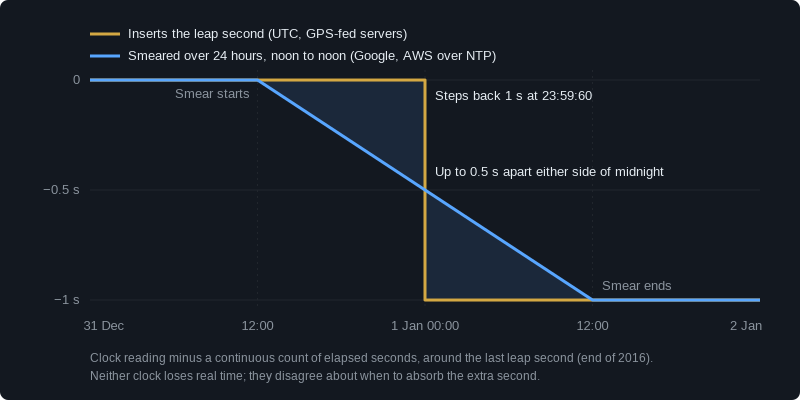
A clock that follows UTC inserts the extra second at midnight as 23:59:60, so it steps back one second against elapsed time. A smeared clock runs slightly slow for a day and loses the same second gradually; Google runs 11.6 ppm slow from noon to noon. Both end the day agreeing. In between they are up to half a second apart, which is why you don't mix the two in one client.
Is this still a problem? Mostly no, but not never. There hasn't been a leap second since the end of 2016. The IERS's latest bulletin, from July 2026, says there won't be one at the end of 2026, and UTC is currently only about 0.05 seconds from UT1 (IERS Bulletin A), nowhere near the 0.9 second limit. In 2022 the CGPM voted to stop adding leap seconds by 2035. Until then one can still be announced. Bulletin C comes out every January and July, so notice is usually about six months. The Earth has also been spinning slightly faster, and a 2024 study in Nature put a possible first negative leap second, a skipped 23:59:59, around 2029. Almost no software has ever seen one.
So for now, smearing only matters on the day of a leap second, and there may never be another. Keep smeared and non-smeared sources apart anyway, because it costs nothing, and watch the IERS bulletins. If one is announced, you have about six months to check your estate.
Domain time versus AWS time
If your domain runs partly in AWS, you have two clocks that both think they are right. Your Windows machines follow the PDC emulator through NT5DS. AWS services, and every Linux instance left on its defaults, follow Amazon Time Sync if you are using standard AWS images. They typically agree to within a few milliseconds.
When the PDC emulator drifts, for whatever reason, the whole domain drifts with it while AWS clocks continue keeping time from their atomic clocks. AWS would then reject signed API requests (SigV4) that arrive more than five minutes from the timestamp in the request. SAML assertions from AD FS to IAM Identity Center contain validity windows, and temporary credentials from STS expire on AWS time, not your PDC time.
CloudTrail stamps events with AWS time while your Windows event logs carry domain time, so in an investigation the two stop lining up exactly when you need them to. Leap seconds add a subtler mismatch: AWS smears them, so a PDC emulator on non-smeared sources sits up to half a second apart from AWS for the day of a leap second.
If most of the estate is in AWS, put the domain on AWS time: point the forest root PDC emulator at Amazon Time Sync, on the link-local address if it runs on EC2 or time.aws.com if it doesn't, or point every Windows VM in AWS at it directly, as below.
How many clocks you really get
Good timekeeping comes from several independent sources. Time underpins authentication, logging and audit, so it deserves the same design attention as identity or networking. Talk to your architects and your cyber security people early, and design time services that are both resilient and accurate, rather than taking whatever the firewall happens to allow.
Microsoft recommends three or more sources so a client can outvote a bad one. That only works if the sources are independent. 169.254.169.123 and time.aws.com are two paths to the same Amazon clock, not two opinions. The same goes for metadata.google.internal and time.google.com; Google goes further and says to use only the metadata server. More servers from one lineage keep time flowing when a path fails. They can't tell you the lineage itself is wrong. Only an independent clock can.
In practice, most of your fleet can't reach outside clocks anyway. A machine gets one source: the cloud's link-local clock, the PDC emulator through NT5DS, or an internal stratum 2 server shared to the fleet. For most use cases the link-local clock is good enough. On a domain you may only get one reachable clock too, the cloud clock or a PDC emulator on premises.
So:
- Accept one clock for most machines. The cloud's link-local address, the PDC emulator, or an internal stratum 2.
- Give the shared sources a few clocks where you can. The PDC emulator or an internal stratum 2 serves everyone else, so it is the one place more than one independent clock is worth fighting the firewall for.
- Where only one clock is reachable, monitor it from somewhere else. A monitor with its own outside access compares your clock with independent lineages, picked from the public time servers list, and alerts when they drift apart. It watches; it doesn't steer.
Configuring Windows VMs
There are two ways to run Windows time in a cloud, and both work. Pick one for the estate and set it everywhere.
Follow the domain (NT5DS). This is what Microsoft and AWS recommend. Members take time from a DC in their site, DCs take it from the forest root PDC emulator, and only the PDC emulator touches a cloud clock. Every Windows machine, in any cloud or on premises, follows one lineage, and DCs sign the time they hand out. The cost is a few milliseconds per hop, which Kerberos doesn't notice, and a PDC emulator that drifts takes the whole domain with it, away from the cloud's own clock.
Follow the cloud's clock directly. This is an option we suggest considering, not Microsoft's guidance: Microsoft recommends the domain hierarchy above. On AWS and Google Cloud the time service sits on every host, so a Group Policy can point every Windows VM in that cloud at it, DCs included: 169.254.169.123 on AWS, metadata.google.internal on Google Cloud. Every machine then reads the same clock the cloud's own services check against, with no hops and no waiting on the PDC emulator. Kerberos still works because DCs and members read the same clock. In the enterprise, firewalls and security teams often won't let the PDC emulator reach three or more outside sources; the link-local address needs no firewall rule, because it never leaves the host. It also takes the PDC emulator out of the time path for that cloud, so a PDC fault no longer moves every machine in it.
What following the cloud's clock costs:
- Signed time. NT5DS responses are signed by the DC; link-local NTP isn't. The address can't be reached from off the host, so spoofing it needs the host already.
- Scope. A machine outside that cloud that picks up the policy, an on-premises server or a laptop, has no time source and free-runs without complaint. Filter the GPO by OU or WMI to that cloud's VMs, and leave everything else on NT5DS. Decide too whether the DCs in your buildings and data centre share a source with the cloud, or keep their own; that choice sets your failure domains.
- Azure. Azure has no link-local NTP address. Its host clock reaches Windows through the VMICTimeProvider, which Microsoft says to turn off on DCs and, in Azure, on members too (Microsoft Learn, time mechanism for AD VMs in Azure), so on Azure follow the domain.
Whichever you choose, set Type explicitly with Group Policy. AWS images ship as a standalone NTP client pointed at 169.254.169.123, and when the instance joins a domain Type becomes AllSync, which takes time from the domain and the link-local address at once. That is two lineages in one client.
| Role | Follow the domain | Follow the cloud's clock (AWS, Google Cloud) |
|---|---|---|
| Forest root PDC emulator | The sources below. Type NTP, marked reliable | The local address. Type NTP, marked reliable for anything still on NT5DS |
| Other domain controllers | NT5DS | The local address. Type NTP |
| Members in that cloud | NT5DS | The local address. Type NTP, from a GPO scoped to that cloud |
| Machines outside that cloud | NT5DS | NT5DS |
| Every DC | Secure Time Seeding off | Secure Time Seeding off |
Sources for the forest root PDC emulator:
| Cloud | Steer from | Second path to the same clock |
|---|---|---|
| AWS | 169.254.169.123 |
time.aws.com, if the PDC can reach out |
| Azure | time.windows.com, or a stratum 1 you run. No link-local address; VMICTimeProvider disabled, and on members too so they follow the DCs, not the host |
None |
| Google Cloud | metadata.google.internal |
None; Google says to use it alone |
For anything the monitor watches, or extra sources where the firewall allows, pick independent clocks from the public time servers list.
If the PDC emulator can reach three or more independent clocks, and you accept that smeared and non-smeared sources part by up to half a second on a leap second day, it can outvote one. Most can't, and the monitor is the safer way to catch a bad lineage.
Set the PDC's sources with a Group Policy object filtered by WMI to the PDC role (DomainRole = 5), not on the server itself. That filter matches the PDC emulator of every domain, so in a multi-domain forest link the GPO to the Domain Controllers OU of the forest root domain only. When the role moves, the time configuration moves with it, which closes the first of the common domain time faults. Microsoft's guide for AD on Azure uses exactly this pattern. The w32time commands for each role are on the time sync commands page.
Configuring Linux VMs
Linux machines are outside the domain's time hierarchy, so each one takes time from the cloud directly. Use chrony with the local source. Another server from the same cloud is a second path, not a second opinion. To check the clock, add other lineages as noselect, which measures them without steering, or watch it from a monitor.
| Setting | AWS | Azure | Google Cloud |
|---|---|---|---|
| Local source | server 169.254.169.123 prefer iburst minpoll 4 maxpoll 4 |
refclock PHC /dev/ptp_hyperv poll 3 dpoll -2 offset 0 (the host's clock, already in recent images) |
server metadata.google.internal prefer iburst |
| Second path | time.aws.com, if outbound NTP is allowed |
None needed | None; Google says to use the metadata server alone |
| Checks, not steering | Independent clocks from the public time servers list, as noselect, where outbound NTP is allowed |
The same | The same |
| How it gets there | The image or config management, plus ntp-servers in the VPC's DHCP options set. Many distributions ignore DHCP NTP unless chrony is set up to read it |
The image or config management. Azure has no DHCP NTP option | The image or config management |
| Microsecond workloads | refclock PHC /dev/ptp_ena in a precision-time placement group. The PTP clock doesn't smear, so keep the NTP sources out of it during a leap second |
The host PTP clock above. Microsoft publishes no accuracy figure | Not offered |
Time as a failure domain
Every clock lineage in the estate is its own failure domain. A fault in one moves every machine that follows it, together, and nothing else. That's why one bad clock can split an estate in two without either half noticing.
| Lineage | Who follows it | What a fault breaks |
|---|---|---|
| Forest root PDC emulator | Every Windows machine on NT5DS | Kerberos, Windows event log timestamps, anything signed or authenticated by the domain |
| Data centre stratum 1 (GPS) | On-premises Linux, network gear, the PDC if it sits there | On-premises logs, certificates and replication |
| Amazon Time Sync | EC2 Linux, Windows VMs pointed at it directly, and AWS's own services (CloudTrail, STS, request signing) | API calls from your machines, CloudTrail correlation |
| Azure host time | Azure Linux, Azure Windows not yet moved off the VMICTimeProvider | Azure-side logs and anything comparing them with the domain |
| Google time | Compute Engine Linux and Google's own services | Google-side logs and API calls |
What you can manage:
- How many sources each lineage has and which one the PDC emulator follows.
- That every Windows machine is set to one pattern, NT5DS or the cloud's clock, never
AllSync, and Secure Time Seeding is off on DCs. - How far apart the lineages are allowed to drift before someone is told. Run one chrony monitor per site with the other lineages added as
noselectsources, chart the offsets, and alert when they pass your budget. - How long the domain survives losing the WAN. Put a DC in every site so members sync locally, and give each site's DCs a clock that holds well.
What you can't: a provider's clock fault, its smear policy, or the clocks behind SaaS identity providers and APIs. You can only measure them and set your tolerances.
A data centre and one or two clouds
| Estate | Forest root PDC emulator | Its sources | Outside the domain's lineage |
|---|---|---|---|
| Data centre plus one cloud, mostly on premises | In the data centre | Three or more local stratum 1 or public non-smeared sources | The cloud's Linux and services. Up to 0.5 s apart during a leap smear |
| Data centre plus one cloud, mostly in the cloud | In the cloud | The cloud's local address, or every Windows VM in the cloud on the local address. A monitor checks it against other lineages | Nothing, if the data centre's Linux and network gear also point at the cloud's public endpoint, such as time.aws.com. Data centre DCs now depend on the WAN for time |
| Data centre plus two clouds | Where most of the authentication happens | That location's lineage | At least one cloud, always. Set a budget, for example logs within 100 ms and authentication within a minute, and monitor the gap between lineages |
The forest root belongs where the clocks that matter meet: the place where Kerberos, SAML and API request signing all check timestamps against each other. Everything else is a budget you measure. There is no clear-cut recommendation. Measure the latency and see what your results are in context against your sources.
For your particular use case:
- Is the drift/latency budget a problem?
- Can you live with disagreement of 10 ms?
- Do you really need your clocks running in the microsecond range?
Recommendations
- In the cloud, use the provider's link-local time service and don't mix it with other lineages.
- Pick one pattern for Windows: follow the domain, or on AWS and Google Cloud follow the cloud's clock directly. On Azure, follow the domain.
- Set
Typewith Group Policy either way. AWS images ship as standalone NTP clients and becomeAllSyncwhen they join a domain. - Accept one clock for most machines: the cloud's link-local address, the PDC emulator, or an internal stratum 2.
- Give the shared sources, the PDC emulator or an internal stratum 2, a few independent clocks where the firewall allows.
- Where only one clock is reachable, run a monitor with its own outside access and alert when lineages drift apart.
- If you follow the cloud's clock, scope the policy to that cloud's VMs and leave everything else on NT5DS.
- Monitor the gap between lineages, not just each clock against its own source.
Feedback and help
If your measurements or your vendor's documentation say something different, tell us and we'll correct the article. If you want a second pair of eyes on your time architecture, from the domain hierarchy to monitoring, we can help with that too. Either way, email thomas.hamer@hamertechnical.com.au.
Sources
- AWS: Precision clock and time synchronisation on your EC2 instance
- AWS: It's about time, microsecond-accurate clocks on Amazon EC2 instances
- Microsoft Learn: Time sync for Linux VMs in Azure
- Google Cloud: Configure NTP on a VM
- Google Public NTP: leap smear
- Wikipedia: Leap second smearing
- Microsoft Learn: Support for the leap second (KB 2722715)
- Microsoft Learn: Time sync for Windows VMs in Azure
- AWS: Signature Version 4 for API requests
- AWS: Set the time reference on your EC2 instance to use the local Amazon Time Sync Service
- AWS re:Post: Sync time on domain-joined instances with AWS Managed Microsoft AD
- Microsoft Learn: Time mechanism for Active Directory Windows VMs in Azure
- BIPM: CGPM 2022 Resolution 4, the future of the leap second
- IERS Bulletin C: leap second announcements
- IERS Bulletin A: UT1 - UTC
- The Register: Windows Server 2019 leap second support, quoting Microsoft (2018)
- Nature: Agnew, A global timekeeping problem postponed by global warming (2024)
- Microsoft Learn: Windows Time event IDs 24, 29 and 38 on a virtualized domain controller (KB 976924)
- Microsoft Learn: Secure Time Seeding recommendations for Windows Server (updated February 2026)
- chrony.conf directives